
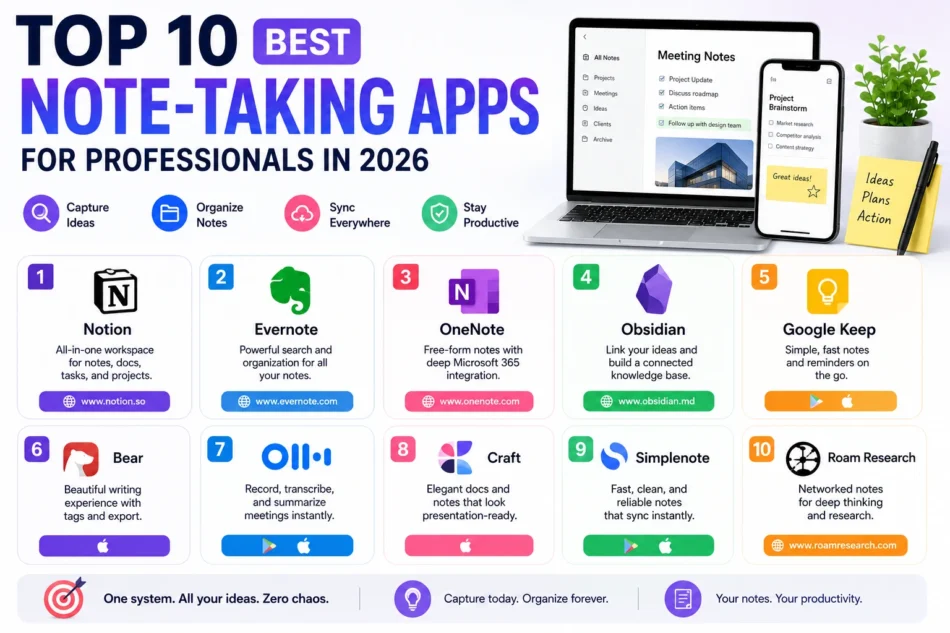

Professional note-taking has requirements that go well beyond a simple notepad, searchability across months of meeting notes, easy organization by project or client, and reliable sync across a laptop and phone so nothing important gets stranded on a single device. The ten apps below each bring a slightly different strength to that problem, and most professionals eventually settle on one or two as their permanent system rather than constantly switching between them every time a new app trends online. Here’s a rundown of the best note-taking apps for professionals in 2026.
Notion
Notion’s database-driven flexibility makes it genuinely strong for professionals who want notes, project tracking, and documentation living in one connected system rather than scattered across separate tools.
Evernote
Evernote remains a solid choice for professionals who prioritize powerful search across years of accumulated notes, including text found inside scanned images and handwritten notes.
Microsoft OneNote
OneNote’s free-form canvas and deep Microsoft 365 integration make it a natural fit for professionals already working inside Outlook and Teams throughout their day.
Obsidian
Obsidian’s linked note structure appeals to professionals in research-heavy or knowledge-intensive roles who need to trace connections between ideas across a large volume of accumulated notes.
Google Keep
Google Keep keeps things deliberately simple with color-coded sticky notes and quick voice memos, ideal for professionals who want fast capture over deep organization for quick, short-lived notes.
Bear
Bear offers a genuinely beautiful, distraction-free writing environment with flexible tagging, making it a favorite among Mac and iOS professionals who prioritize a clean interface over heavy feature sets.
Otter.ai transforms spoken meetings directly into searchable, summarized text notes, saving professionals from manually typing notes during calls or in-person discussions.
Craft
Craft combines a genuinely polished writing experience with document-style formatting, appealing to professionals who want their notes to look presentation-ready without extra formatting effort.
Simplenote
Simplenote strips away nearly every extra feature in favor of pure speed and reliability, appealing to professionals who just want plain text notes that sync instantly without any distraction.
Roam Research
Roam Research pioneered the networked note-taking approach that Obsidian and others later popularized, remaining a strong choice for professionals in research and academic-adjacent roles who value its specific linking philosophy.
Building a Note System That Actually Sticks
The biggest reason professional note-taking systems fail isn’t the app choice, it’s inconsistency, notes scattered across three different apps because none of them ever became the default habit. Pick one primary app for structured, long-term notes and stick with it for at least a full quarter before judging whether it’s working, switching tools too early rarely gives any system a fair chance to actually prove itself. A lightweight capture tool like Google Keep alongside a more structured primary system like Notion or Obsidian tends to cover both quick captures and deeper organization without needing ten different apps running simultaneously. Whatever combination you land on, review your notes periodically rather than only writing them down, a note nobody revisits provides little more value than one never taken at all.
There’s no universally best note-taking app on this list, only the one that matches how you personally think and work, structured databases, freeform linking, or simple plain text. Try narrowing down to two candidates based on your actual daily workflow rather than reading more comparisons, and commit to one for real use before deciding it’s not working. A month of genuine daily use will tell you more than any feature comparison chart ever could.
