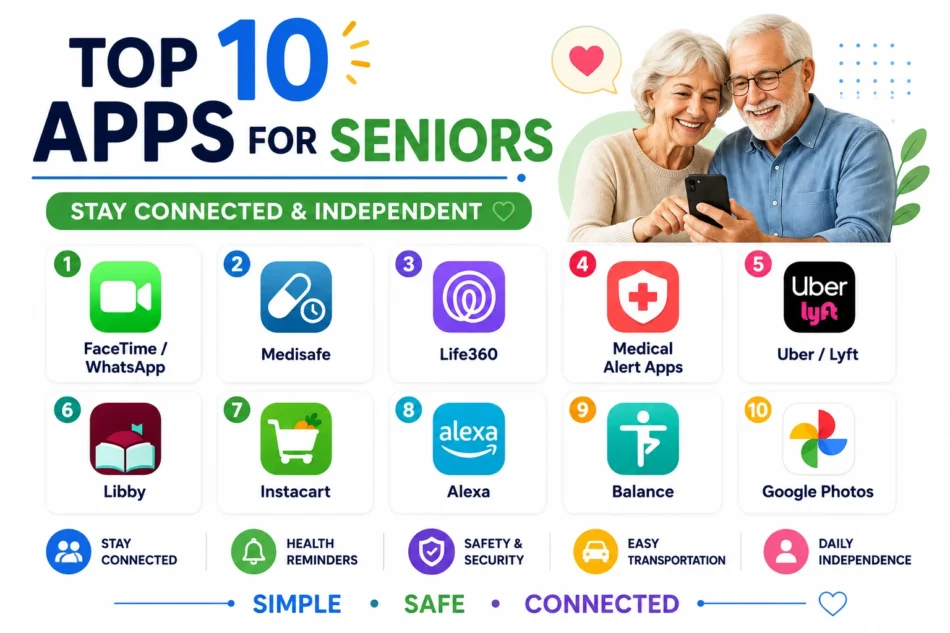

Staying connected with family, managing medications correctly, and maintaining genuine independence at home all become somewhat more complicated with age, but the right apps, chosen with an eye toward simplicity and genuinely large, readable interfaces, can meaningfully support all three without requiring a senior to become a technology expert first. The best apps for this specific audience prioritize clear, uncluttered design over feature density, recognizing that a confusing interface creates more frustration than the convenience is worth. Here are ten apps worth setting up for a senior family member, or for yourself, this year.
FaceTime or WhatsApp Video Calling

Reliable, simple video calling remains one of the most valuable tools for staying genuinely connected with family, and both FaceTime and WhatsApp offer large, clear call buttons that don’t require navigating a confusing multi-step process.
🔗 Download on Play Store | www.whatsapp.com
Medisafe

Medisafe sends clear medication reminders with genuinely simple large-text notifications, and can alert a designated family member if a dose gets missed, adding a real safety net beyond just the reminder itself.
🔗 Download on Play Store | www.medisafe.com
Life360

Life360 lets family members share location for genuine peace of mind, useful both for seniors wanting family to know they’re safe on an outing and for family members who want to check in without an intrusive phone call.
🔗 Download on Play Store | www.life360.com
GreatCall Lively (or a Similar Medical Alert App)
Medical alert apps and companion devices provide a genuinely simple, one-touch way to reach help in an emergency, offering real peace of mind for seniors living independently without a family member always nearby.
Uber or Lyft

Ride-hailing apps offer seniors continued independence for errands and appointments once driving becomes more difficult, and both platforms have simplified their interfaces enough to be genuinely manageable with some initial guided practice.
🔗 Download on Play Store | www.uber.com
Libby

Libby lets seniors borrow ebooks and audiobooks from a local library directly on a tablet or phone, offering a genuinely large, accessible source of reading material without needing to physically visit a library branch.
🔗 Download on Play Store | libbyapp.com
Instacart or a Similar Grocery Delivery App
Grocery delivery apps reduce the physical demands of regular shopping trips, letting seniors maintain independent household management without the genuine physical strain that a full grocery run can involve.
Amazon Alexa App

Voice-activated smart assistants let seniors set reminders, make calls, and control smart home devices through simple voice commands, removing the need to navigate small on-screen text and buttons for many common daily tasks.
🔗 Download on Play Store | alexa.amazon.com
Balance or a Similar Gentle Fitness App
Gentle, senior-focused fitness and balance apps offer genuinely appropriate exercise guidance for maintaining mobility and reducing fall risk, tailored specifically to a slower pace than typical mainstream fitness apps assume.
Google Photos
Google Photos automatically organizes and backs up family photos, making it genuinely easy for seniors to view and share cherished memories with grandchildren without needing to manage complicated file storage manually.
Setting up these apps together with a family member initially, rather than expecting a senior to configure everything independently from scratch, tends to matter more for genuine long-term adoption than which specific app is chosen. Prioritizing video calling and a medical alert app first addresses the two most important needs, connection and safety, before layering in convenience apps like grocery delivery or ride-hailing as comfort with the phone grows. Adjusting phone-wide text size and enabling any built-in accessibility features before installing individual apps also meaningfully improves usability across every app on the list, not just one specifically. Regular, patient practice sessions together, rather than a single overwhelming setup session, tend to build genuine lasting confidence far more effectively than installing everything at once and hoping it sticks.
Technology can genuinely support both connection and independence for seniors when the apps chosen prioritize simplicity and real safety over flashy features nobody asked for. Start with video calling and a safety net app first, then add convenience and entertainment apps gradually as comfort grows, and patient, hands-on setup together matters more than any single app on this list.