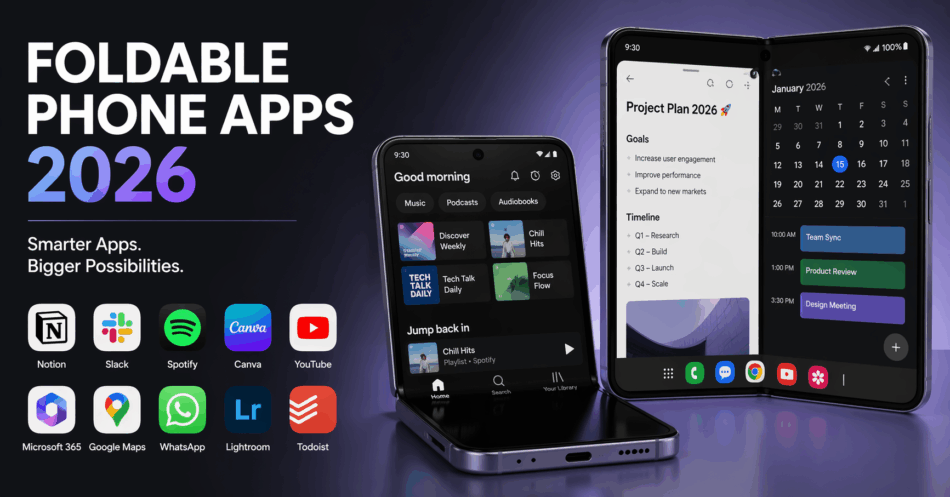

Foldable smartphones represent the most significant mobile form factor innovation in decades, offering tablet-sized screens folding into pocketable dimensions. However, hardware capabilities mean nothing without software optimization—foldable phone app experiences determine whether these devices deliver on productivity and entertainment promises or merely function as expensive standard phones. Developers adapting applications for multi-window support, responsive layouts, and continuation features unlock foldable devices’ transformative potential.
Understanding Foldable Optimization
Standard mobile applications designed for fixed aspect ratios often display awkwardly on unfolded screens—oversized interfaces wasting screen real estate, non-responsive layouts creating usability issues, or simply letterboxed displays defeating foldable purposes. Properly optimized foldable phone app implementations dynamically adjust layouts based on screen configuration, support multi-window multitasking seamlessly, and maintain context when transitioning between folded and unfolded states.
Samsung, Google, and other manufacturers provide development guidelines and testing tools enabling foldable phone app optimization. Despite these resources, many popular applications remain inadequately adapted, creating frustrating experiences undermining foldable value propositions. Users should prioritize applications demonstrating explicit foldable support rather than assuming universal compatibility.
Productivity and Multitasking Excellence
Microsoft Office Suite exemplifies foldable phone app productivity optimization. Word documents display in desktop-like layouts when unfolded, Excel spreadsheets become genuinely usable without constant zooming, and PowerPoint editing approximates laptop experiences. Multi-window support enables referencing email while drafting documents, reviewing spreadsheets alongside presentations, or any combination business workflows require.
Samsung Notes leverages foldable screens transforming note-taking through expanded canvas space. Handwriting recognition becomes practical for extended writing sessions, split-screen enables referencing materials while noting, and folder organization manages note collections efficiently. S Pen support on compatible devices creates digital notebook experiences rivaling physical alternatives.
Google Meet and Microsoft Teams optimize video conferencing for foldables. Unfolded screens display larger video feeds improving visual communication, split-screen modes enable viewing presentations while monitoring chat, and flex mode transforms devices into standalone conference systems when partially folded—camera positioning at optimal angles without additional stands.
Content Consumption Optimization
YouTube provides dedicated foldable phone app interfaces maximizing video viewing experiences. Unfolded screens display videos at impressive sizes approaching small tablet territory, while picture-in-picture modes enable browsing content while videos play. Flex mode supports hands-free viewing with devices partially folded—ideal for watching content during meals or workouts without stands.
Kindle transforms e-reading on foldables through book-like dual-page layouts impossible on standard phones. Unfolded screens display facing pages mimicking physical book experiences, larger text sizes improve readability without sacrificing content density, and extended reading sessions become comfortable through reduced scrolling and page turns. For users managing extensive reading lists, explore note-taking apps which complement digital reading workflows.
Twitch optimizes live streaming through expanded video players, integrated chat displays without obscuring streams, and multi-stream viewing enabling simultaneous content consumption. Gaming streams particularly benefit from larger displays revealing details invisible on standard phone screens.
Creative and Design Applications
Adobe Photoshop Express and Lightroom unlock mobile photo editing potential through foldable screens providing workspace approaching tablets. Editing interfaces display tools alongside previews reducing workflow interruptions, precision editing becomes feasible through expanded touch targets, and split-screen comparisons enable before/after evaluations. Professional photographers leverage foldables for field editing previously requiring laptops.
Infinite Painter demonstrates foldable phone app artistic potential. Digital artists access tablet-like canvas space in portable form factors, stylus support enables detailed illustration work, and layer management becomes practical through expanded interface real estate. The combination rivals dedicated drawing tablets while maintaining phone portability.
Gaming Experiences
Genshin Impact and similar graphically intensive games benefit substantially from foldable displays. Larger screens improve immersion and visibility, higher-quality texture details become appreciable, and UI elements spread across expanded space rather than cluttering views. Controller support transforms foldables into portable gaming systems rivaling Nintendo Switch experiences.
Cloud gaming services like Xbox Cloud Gaming and NVIDIA GeForce NOW shine on foldables. Console-quality games stream to tablet-sized displays maintaining portability, touch controls benefit from expanded screen real estate, and Bluetooth controller pairing creates legitimate portable gaming rigs. Foldables uniquely balance screen size with portability for cloud gaming optimization.
Banking and Finance Applications
Chase Mobile, Bank of America, and major foldable phone app banking platforms optimize for expanded screens. Account dashboards display comprehensive information without scrolling, check deposit interfaces provide larger viewfinders improving capture accuracy, and investment portfolio overviews present data-rich visualizations impossible on standard phones.
Multi-window support enables financial multitasking: monitoring stock portfolios while researching investments, reviewing account activity while making transfers, or comparing banking services while budgeting. For comprehensive expense management, review our expense tracker apps optimized for financial oversight.
Development Considerations
Developers adapting applications for foldables must address: responsive layout systems accommodating aspect ratio changes, multi-window lifecycle management maintaining state across configurations, continuation APIs preserving context during fold/unfold transitions, and flex mode support for partially folded positions. Google provides Jetpack WindowManager library simplifying implementation.
Testing across device variations—Samsung Galaxy Fold/Flip series, Google Pixel Fold, and others—ensures compatibility despite manufacturer implementation differences. Emulators accelerate development but physical device testing remains essential validating real-world experiences.
Future Foldable Evolution
Foldable phone app ecosystem maturity depends on developer adoption rates and user base growth. As foldable sales increase, developer investment in optimization grows proportionally—creating positive feedback loops improving experiences. Future form factors including rollable and dual-screen devices will demand continued adaptation, though foundational responsive design principles remain consistent.
For insights into broader mobile development trends, explore our best practices for mobile app development covering adaptive design principles applicable to emerging form factors.
Conclusion
Foldable phone app optimization transforms innovative hardware into genuinely useful productivity and entertainment tools. Microsoft Office maximizes work capabilities, YouTube optimizes media consumption, Adobe applications enable mobile creativity, and gaming services deliver console experiences portably. However, foldable potential remains unrealized without widespread developer support—users should prioritize applications demonstrating explicit optimization when selecting software ecosystems. As foldable adoption grows, expect increasing foldable phone app sophistication unlocking possibilities impossible on traditional form factors. The future of mobile computing increasingly unfolds—literally—through screens adapting dynamically to user needs and contexts.